Printing
Maps & Guides For Self-Guided Scenic Drives & Activities
We provide three levels of self-guided
scenic drives which include activities. All three levels are on the same paved roads. In
addition to paved roads Level 3 includes back country forest dirt roads. All three levels
have plenty of gas stations, places to eat, shopping, and restrooms.
Information Accuracy - Been There, Done All
That - Everything in this Web site is original content produced by 2Cooleys. We
drew all the maps. We wrote the directions. We did the research. We've driven every road.
Visited every spot (except we still have a few miles of trails to hike). Not once, but
many times. Year after year, for 15 years, in every season. Fall foliage. Spring foliage.
Summer green. Deep winter snows. We've stopped at all the C-stores, dined in all the
restaurants, shopped all the stores, and visited every attraction more than once. Yet all
the above does not mean we're 100 percent right all of the time on all topics. Therefore:
Disclaimer: While every attempt has been made to ensure accuracy on all
matters covered about the Sylamore Ozark National Forest Area in this web site, we make no
guarantees of precise distance accuracy, road conditions, road closings, or the open
hours, phone numbers, or street addresses of any business on this tour. Any of these can
change at any time without notice to us, or to the Free World. Therefore 2Cooleys makes no
representations or warranties regarding the accuracy or completeness of any content
herein. Further, 2Cooleys disclaims all warranties in connection with the content herein,
and will not be liable for any damage or loss resulting from your use of this content. The
USDA Forest Service and it's affiliate operations is not, nor is any municipality, nor is
any other party or organization, party to or an affiliate of this 2Cooleys web site in any
capacity. We have used numerous Public Domain information sources, including several maps
produced by several different third parties, in the production of this web site.
Choosing & Printing
Maps & Tour Guides (Summaries)
Level 1, The Express Tour - A quick
two to three hour scenic drive on main paved roads. See Ozark hill country. Great for
viewing spring blooms and fall foliage, sportscar and motorcycle runs, or a simple
afternoon scenic drive. The Fast Tour Map shows only 21 of 47 Map Points. The Express Tour
Guide only gives driving directions for the main tour loop. Both map and guide fit on two
pages. Print out the Express
Tour Guide and the Fast
Tour Map . Bring both pages with you.
Level 2, The Day Tour - For those
who want to spend 4 to 8 hours on the tour. Same roads as Level 1. Same map as Level 1,
but the Day Tour Guide includes 6 pages of Point-to-Point driving directions with short
descriptions of what's at each Point. Print out the Day Tour Guide, and the Fast Tour Map. This takes
6 to 7 pages total. Bring all with you.
Level 3, The Complete Tour - For
those who want to customize their tour. Blend any combination of paved and back country
dirt roads with attractions, meals, shopping. Also very good for those who are going to
hike, camp, bike, ride horse trails, or otherwise spend more than a day exploring the
Sylamore Area. The Complete Tour Guide is 9 pages long and gives driving directions for
all 47 Map Points with brief descriptions of what is at each Point. Print out the Complete Tour Guide, and the Complete Tour Map. Bring all
with you.
Printing Other Information - Print
out any Point Details page, or any other page in the site you think might be helpful
during your trip to the area.
Map Points - Using The Features
Of This Site
All scenic drives and
activities are organized by numbered Map Points.
Map Point List - Lists all
47 Map Points. Quickly see what is at each Point, or a group of Points. Click any Point
for more details on that Point.
Point Details Pages - What comes up
when you click on any Point on the Interactive Maps, or any link in the Map Point List.
Point Details explain what is at the Point in question. Print out any Points Details page.
Interactive Maps - There are two
interactive maps. The Complete Tour Map shows all 47 Points and more area detail. The Fast
Map shows 21 Points and 50 percent less area detail. The advantage of any Map is that you
can see all of the Points and roads in relationship to each other for the entire tour.
Tour Guides - Point-by-Point
driving directions with brief descriptions of what is found at each Point. Though designed
to be printed out and brought along, the guides do have clickable links to Point Details
pages. To keep the number of pages as small as possible, few graphics are used in the
guides.
Activities & Services - Locate
interests by topic instead of a Point number. This is a page listing all area activities
and services on, or close to, the entire tour. For example, clicking Cabins &
Hotels under the Lodging header takes you to a page listing all the Points where you can
find close by cabins and motels.
Photos - Clicking the Photos link
brings you to a list of photos for all Points on the tour. Links to photos are also in the
Photo Details pages.
More On Using 2Cooleys Maps & Guides
Interactive Tour Maps Have Clickable Point Numbers
- Clicking any color coded rectangular-shaped numbered Point on the interactive maps
brings up the details for that Point. Points with blue backgrounds indicate the main
tour loop, which is all paved roads. Points with green backgrounds indicate back country
dirt road side trips. Points with orange backgrounds indicate side trips on paved roads.
Try it out below. The Interactive Tour Maps are too large to print out on one page using
standard printers. That is why we have separate down-sized maps that will print on one
page.
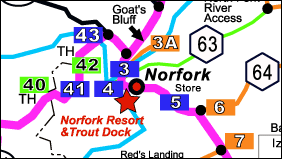
Click Green, Blue, & Orange Map Points
Warning! - The Google maps, as well as many other online maps, and many
topo maps, are seriously out of
date. Counties and the Forest Service have since re-named several back country roads. Some
of the roads shown on these various maps are no longer open. The aerial photos you see on
Google Earth and others are very old. All of these maps can be useful for many things,
like looking at the terrain. But road names, and closed roads are frequently wrong.
Printable Tour Guides
If printed out all the information in this site would fill a book.
To keep the Print Tour Guides as short as possible we use driving directions and short
descriptions without photos. The Print Tour Guides lists each Point in order. Each Point
has a clickable Header and a Description.

Sample Point Description From Tour Summary
Point Number & Clickable Link - All Point
Headers and Descriptions in the Tour Guides look like the above example. Point numbers are
color-coded in the Guides to match the 2Cooleys map. The blue underlined words after the
Point number tell what is at the Point, and what there is to do at that Point. This is a
clickable link as well. When clicked it brings up the details for the Point.
Bathrooms - The header abbreviation in parentheses
always indicates two things. First is that there is a bathroom at the Point, second what
kind of bathroom it is. If there is no abbreviation in parentheses, then there is no
bathroom of any kind at the Point. The abbreviation definitions for bathrooms are given on
the Guide legends. RR stands for a standard rest room, VT
stands for vault toilet which is basically a fancy outhouse. PT stands
for Porta-Potty toilet, one of those little green portable toilets seen at outdoor events.
Distance - The distance between two Points is in
red at the ends of headers. We give the distance this way so that the tour can be run
forward or backward without confusion.
Cell Signal Icon - The little blue  icon means that there is cell signal at the Point.
While the Sylamore area has several cell towers, the hills block signal in many locations.
You cannot get cell signal in about 50% of the tour. icon means that there is cell signal at the Point.
While the Sylamore area has several cell towers, the hills block signal in many locations.
You cannot get cell signal in about 50% of the tour.
Driving Directions & Description - Under the
header is the driving directions for the Point, and a short description of what is there.
Why We Don't Give GPS Coordinates -
Experience from previous projects taught us that giving GPS coordinates confuses too many
people. Google uses a different GPS datum system than many hand-held GPS devices. If
people are not using the same GPS datum system we used to generate coordinates, they'll be
seriously mis-guided. Many people are not even aware of what a datum system is, let alone
know which one to use.
Why We Give Street Addresses - These
days it is better to give a street address than a GPS coordinate. All a person needs to do
is enter the street address into their smart phone and regardless of the datum system
used, they'll get directions.
Back to Top |


